
 One
 CRM
 Books
 People
 Payroll
 Mail
 Recruit
 Inventory
 Creator
 Catalyst
 Lovable
Does Zoho Have an ERP? How Growing Businesses Run One on Zoho
Last reviewed: October 2026. Zoho's ERP availability and licensing are changing quickly, so check the current position with Zoho or with us before you plan around anything in this post.
"Does Zoho have an ERP?" is one of the questions we hear most often from finance heads and operations managers, usually a few minutes into a first call. They've been told Zoho is good for CRM and accounting, they're running something heavier for stock or production, and they want to know whether they can bring it all onto one platform.
The short answer has changed this year. Since January 2026 there is a product called Zoho ERP. It's available in India, and Zoho has said it will roll out to other countries, but at the time of writing it hasn't published dates for the UAE or anywhere else.
So the useful answer depends on where you are. If you're in India, you have a choice between the new Zoho ERP and the older route of connecting individual Zoho apps. If you're in Dubai, Riyadh or London, the connected-apps route is what's on the table today, and it's what a lot of growing businesses already run.
This post covers both. We'll explain what Zoho ERP includes, how the connected-apps approach maps onto the things an ERP is supposed to do, where each route works well, and where you should slow down and check before committing.
First, what do people mean by ERP?
ERP gets used loosely. For some people it means accounting plus inventory. For a manufacturer it means bills of materials, work orders and production planning. For a group with five companies it means consolidation and inter-company billing.
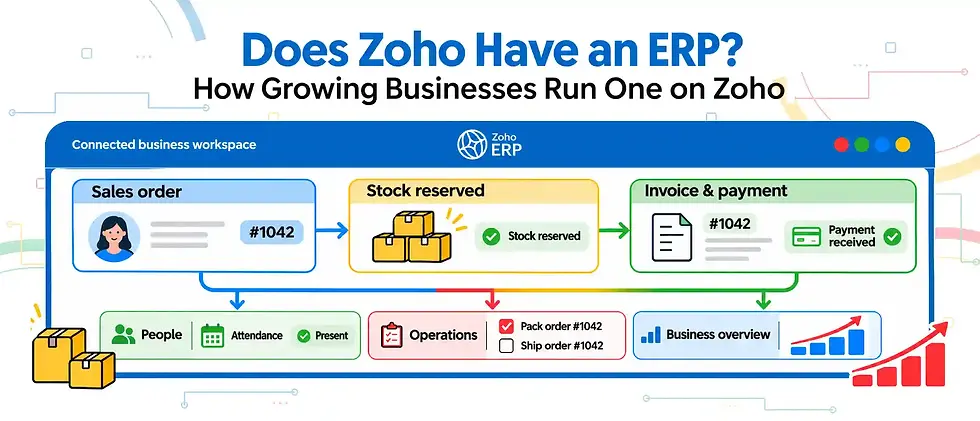
Strip it back and an ERP is one system of record for the money, the stock, the people and the orders, so that a sale updates inventory, inventory updates the books, and the books are right without anyone re-keying numbers at month end.
That last part is what businesses are really paying for. Most of the companies we talk to aren't short of software. They're short of one version of the truth. Sales has its spreadsheet, the warehouse has another, finance reconciles both every month, and everybody distrusts the numbers a little.
Keep that definition in mind, because it's the test to apply to any option, Zoho or otherwise. Does it give you one record, or does it give you five tools that still need a person in the middle?
Zoho ERP: the product launched in January 2026
Zoho launched Zoho ERP on 23 January 2026 at an event in Kumbakonam, a town in the Thanjavur district of Tamil Nadu. It was positioned as an ERP built in India for Indian businesses, particularly companies that have outgrown their current finance systems.
According to Zoho's announcement and the coverage around it, the product brings these areas together:
Core financials, including banking, fixed assets, budgeting, revenue recognition and a continuous financial close
Billing for products, services and subscriptions
Procurement and accounts payable, including purchase orders, invoice scanning and three-way matching
Supply chain, covering suppliers, procurement, production and inventory
Omnichannel commerce across physical and online stores
People management and payroll
Spend management and payments
Tax filing for India, including GST, e-invoicing, e-way bills and statutory payroll deductions such as EPF, ESI and professional tax
Zoho has said the first industry editions cover manufacturing, distribution, retail and non-profits, with more industry capability planned in later releases. Non-profits get specific features like donor tax deduction filings.
Two other points stand out. The first is that AI is built into the product rather than bolted on. Zia, Zoho's assistant, handles things like forecasting, anomaly detection, voice queries and parts of the financial close. The second is that low-code customisation is part of the platform, so a business can adapt screens and workflows without bringing in a separate development tool.
On licensing, the model Zoho launched with has two kinds of user. There's a full licence for people who need access across the modules, and a much lighter employee licence for people who only need role-based access to part of the system, such as submitting expenses or approving a purchase request. A higher Advanced edition is priced on request for larger companies. We won't quote the rupee figures here because pricing at launch tends to move, so check Zoho's current page or ask us for a quote.
Is Zoho ERP just Zoho Books with a new name?
Not quite, though the family resemblance is obvious. Anyone who has used Zoho Books and Zoho Inventory will recognise a lot of the financial and stock logic. The difference is packaging and depth. Zoho ERP is sold and designed as one product with one data model across finance, supply chain, payroll and commerce, with controls that larger finance teams expect, such as audit trails, financial controls and a structured close.
With separate apps, you get many of the same capabilities, but they're joined by integrations between products. Those integrations are good inside the Zoho family, and we'll come to them, but it isn't the same as one application.
Who should look at Zoho ERP now?
If you're an Indian business in manufacturing, distribution or retail, you've outgrown Tally or a basic accounting package, and you were about to start a long evaluation of a large international ERP, Zoho ERP is worth putting on the shortlist. The compliance pieces for India are already there, and the cost of ownership is likely to be a fraction of the big names.
If you're already running Zoho Books, Inventory and CRM happily, don't move just because a new product exists. Ask what problem it would solve. If month-end close takes too long, approvals are being done over WhatsApp, or you can't trust stock valuation, those are good reasons. "It's newer" is not.

Outside India: running an ERP on connected Zoho apps
For a business in the UAE or the wider GCC, Zoho ERP isn't available to buy yet. That doesn't mean you're without options. A large number of businesses here already run their whole operation on Zoho, and the way they do it is by connecting the apps that cover each part of the business.
Here's how the usual ERP functions map onto Zoho products.
Finance and accounting
Zoho Books is the ledger. It handles invoicing, bills, banking, multi-currency, budgets, and in the UAE it supports VAT returns and corporate tax preparation. For most trading and service businesses up to a fair size, Books is a complete finance system on its own.
Where it needs help is multi-entity groups. Books runs one organisation per ledger, so a group with several companies runs several organisations and needs a plan for inter-company transactions and consolidated reporting. That's solvable, often with Zoho Analytics on top, but it needs designing at the start, not discovering at the first year-end.
Inventory, purchasing and warehouses
Zoho Inventory covers items, warehouses, purchase orders, sales orders, batch and serial tracking, and composite items for kits and simple assemblies. It shares data with Books, so a goods receipt or a shipment flows into the accounts without anyone touching it twice.
This is where we'd ask the most questions. Inventory is strong for trading, distribution and light assembly. If you run discrete manufacturing with multi-level bills of materials, routings, machine capacity and shop floor tracking, check carefully whether the standard product reaches far enough. Often the answer is Inventory for stock plus a custom production layer built on Zoho Creator.
Sales, quotes and customers
Zoho CRM holds the pipeline, quotes and customer history, and it connects to Books and Inventory so that a won deal can become a sales order and then an invoice. For businesses with a field sales team or a long sales cycle, this is usually the first app that gets rolled out, and the one where the rest of the system starts paying off.
People and payroll
Zoho People handles employee records, leave, attendance and document expiry, which matters a lot in the UAE where visas, Emirates IDs and labour cards all have renewal dates. Zoho Payroll runs the pay cycle, and in the UAE it can produce WPS salary files and track end-of-service gratuity, posting the journals into Books.
Projects and services
For service companies, contractors and consultancies, Zoho Projects tracks tasks, timesheets and milestones, and project billing can flow into Books. If your margin depends on whether projects come in on budget, this piece matters as much as the ledger.
Spend and approvals
Zoho Expense handles employee claims, corporate cards and travel, with approval rules and policy checks, and posts into Books. It's often a quick win, because chasing receipts is a job nobody misses.
Reporting across the whole business
Zoho Analytics pulls data from all of the above into dashboards and cross-app reports, which is how you get things like gross margin by customer including the cost of the salesperson's time, or a consolidated view across group companies.
The custom piece
There's almost always one process that no standard app covers exactly. A rental business with day-wise billing, a production line with its own job card, a distributor with a commission structure nobody else uses. That's where Zoho Creator comes in, the low-code platform that lets you build the missing piece and connect it to everything else. We've written a separate guide on Zoho Creator and when to build instead of buy.
Holding it together with Zoho One
Buying all of these separately adds up, and it's harder to manage. Most businesses that go this route license Zoho One, which bundles the suite under one per-employee licence. We've written a full piece on Zoho One pricing, so we won't repeat it here. The short version is that if you'd use four or more Zoho apps, it's worth doing the sums.
Connected apps or a single ERP: what's the real difference?
People sometimes assume the connected-apps route is a compromise. For many businesses it isn't. The integrations between Books, Inventory, CRM, Payroll and Expense are native and maintained by Zoho, so you're not relying on a third-party connector that breaks every time an API changes.
The real differences are these.
With connected apps, each app has its own settings, users and permissions. That gives flexibility, because you can roll out CRM in month one and Inventory in month four, but it also means somebody has to own the design across apps. Who creates the customer record? Does the CRM account or the Books contact win when they disagree? Those questions need answers before go-live, not after.
With a single ERP, the data model is shared by design. There's less to decide about where records live, and controls like approval chains and audit trails are consistent across the whole system. You pay for that in a bigger first implementation, because you're usually switching more on at once.
Neither is better in the abstract. A twelve-person trading company in Deira and a two-hundred-person manufacturer in Chennai shouldn't make the same choice.
Where the Zoho route works well
From the projects we've delivered, the Zoho approach fits best when a business looks something like this:
Trading, distribution, retail, professional services, real estate, education or light assembly
A team that wants to move off spreadsheets and disconnected tools without a two-year ERP programme
Leadership who want to see numbers themselves, on a phone, without asking finance for a report
A willingness to adjust some processes to fit good standard software, instead of rebuilding every quirk
That last point deserves a moment. The cheapest, fastest ERP projects are the ones where the business accepts the standard way of doing most things and saves customisation for the processes that make it different. We'll always tell you which of your requirements fall into which bucket.

Where to slow down and check
There are situations where we'd want a careful look before recommending Zoho as the whole answer.
Heavy manufacturing is the obvious one. If production planning, capacity scheduling and shop floor control are core to how you make money, test those requirements in a working session, not on a slide. Zoho ERP's production capabilities are new, and the connected-apps route needs custom work to go deep here.
Large multi-entity groups are another. Ten companies across three countries with inter-company trading, transfer pricing and consolidated statutory reporting can be done on Zoho, but the design effort is real and it should be scoped properly.
Then there's the case where you already have a large ERP that works. Plenty of our clients keep SAP, Oracle, Microsoft Dynamics or Odoo for core finance and production, and use Zoho for the parts that the big system does badly or expensively, like CRM, HR, customer service or field sales. We connect Zoho to those systems through their APIs so data moves both ways. Replacing an ERP that's working is rarely the best use of anyone's money.
The UAE angle
If you're in the UAE, there are a few local points worth knowing.
Zoho Books is set up for UAE VAT, including VAT returns, and supports preparation for corporate tax. Zoho Payroll handles WPS and gratuity. Zoho also runs a UAE data centre, which matters for companies that want their data held in the country, and for companies moving off another Zoho data centre we handle Zoho data centre migration.
The UAE e-invoicing mandate is the change to watch. It requires invoices to go through an Accredited Service Provider, and the rollout is phased. Before you sign anything, ask any vendor or partner exactly where their e-invoicing support stands today, and get the answer in writing. We'd rather tell you a feature is still coming than let you find out at go-live.
If you'd like to talk this through with someone local, our Zoho team in Dubai works from Al Barsha.

How we run an ERP-style rollout on Zoho
Whether it's Zoho ERP in India or a connected suite in the UAE, the way we run the project is the same, and it's worth describing because it's where most of the risk sits.
We start with requirements. Sometimes a client sends a BRD or a process document, sometimes it's a series of calls and workshops with the people who do the work. We sit with finance, sales, the warehouse and HR separately, because each will describe the business differently.
From that we produce documentation: how things work today, how they'll work in Zoho, and the gaps between the two with a proposed solution for each. The to-be design goes into flowcharts, and the client signs those off before we configure anything. It feels slow. It saves weeks later.
Then we configure, and we run conference room pilot sessions, CRP sessions for short, where your team walks through real scenarios in the system. A customer places an order with a discount and partial delivery. A supplier invoice arrives with a price variance. We repeat these sessions until your team confirms the system does what they need.
After that comes internal testing, end user testing, and end user training. Then master data migration, a cut-off date, and go-live. We don't subcontract the implementation, so the consultants who designed your system are the ones who configure and support it.
After go-live there's a month of hypercare with a dedicated consultant, because that's when real transactions expose the edge cases nobody thought of in workshops. After that, most clients move onto a support retainer or an hourly support package.
We quote either a fixed cost for a defined scope or time and materials where the scope can't be pinned down yet. Our Zoho implementation page explains the options in more detail.
Mistakes we see in ERP projects
None of these are unique to Zoho. They show up in every ERP project, and most of them are avoidable.
Switching everything on at once. It's tempting to go live with finance, inventory, CRM, HR and payroll on the same Monday. Unless the business is small, phase it. Finance and inventory together usually make sense because they're so tightly linked. CRM can follow. Payroll often goes best at the start of a pay period, on its own.
Migrating dirty master data. If your item list has the same product under four codes, moving it into a new system gives you four codes in a nicer interface. Clean the item master, the customer list and the chart of accounts before migration. This is dull work and it's the single biggest factor in whether the reports are trusted afterwards.
Rebuilding the old system's workarounds. Teams naturally ask for the new system to behave like the old one, including the parts that were only ever workarounds. Ask why each step exists. A surprising number disappear.
No owner after go-live. Somebody inside the business needs to own the system: user access, small changes, and knowing when to call the partner. Without that person, every small issue becomes a ticket, and adoption stalls.
Leaving the reports until the end. Decide early which reports leadership will look at every week, and design the data to produce them. Discovering after go-live that nobody captured the field you need for margin by region is painful.

Where AI fits in
Zoho has built Zia into the ERP and into most of its apps, for forecasting, anomaly detection, writing and answering questions about your data. It's useful, and it's improving quickly.
We've gone a step further for clients who want it. We've connected most Zoho apps to Claude through MCP, the Model Context Protocol, which lets an AI assistant read and act on live Zoho data with the permissions you give it. In practice that means a finance manager can ask for overdue receivables by customer and region and get the answer in plain language, or an operations head can ask which items are below reorder level across warehouses without opening a report builder. The same approach works with ChatGPT and Copilot. It doesn't replace good data design. It does make a well-designed system far easier for people to use.
Questions to ask before you choose
If you're weighing Zoho ERP, a connected Zoho suite, or something else entirely, these questions will save you time:
Which three processes cause the most pain today, and which option fixes those specifically?
Is Zoho ERP available in my country now, and if not, can I start on connected apps and move later without redoing the work?
How many of our users need full access, and how many only need to submit, approve or view?
What are our compliance requirements this year and next, including e-invoicing, and what's the vendor's documented support for each?
What will we customise, and who will maintain that customisation in three years?
Do we need to keep an existing ERP for some functions, and how will data move between the two?
If a partner can't answer those clearly for your business, keep looking.
Frequently asked questions
Is Zoho ERP available in the UAE?
At the time of writing, no. Zoho launched it in India in January 2026 and has said it will roll out globally, without giving dates for specific countries. UAE businesses can run ERP-style operations today using Zoho Books, Inventory, CRM, People, Payroll and the rest of the suite, connected natively.
Can Zoho replace SAP or Oracle?
For many small and mid-sized businesses, yes. For larger companies with heavy manufacturing or complex group structures, it depends on the requirements, and a hybrid setup where Zoho handles CRM, HR and service while the existing ERP keeps finance and production is common.
Is Zoho One the same as Zoho ERP?
No. Zoho One is a licence bundle that includes most of Zoho's applications under one per-employee price. Zoho ERP is a specific product with its own licensing. Outside India, Zoho One is usually how businesses license an ERP-style setup on Zoho.
How long does a Zoho ERP-style implementation take?
It depends on scope, the number of entities, data migration and how much custom work is involved. A focused finance and inventory rollout for a single company is much quicker than a multi-entity programme with payroll and custom production. We give a real timeline at the end of scoping, not before.
Talking it through
If you're trying to work out whether Zoho can run your whole operation, the fastest way is a working session where we take your three most painful processes and walk them through in the software. You'll come away knowing what fits as standard, what needs customising, and whether you need us at all.
Talk to us. We work with businesses from our offices in Chennai and Dubai.


Comments